Homestay Welcome Card: Wi-Fi, WhatsApp, Directions, and Reviews on One Page
In this article
Quick Summary: Placing a printed four-code welcome card on each guest bedroom nightstand answers the five most frequent questions homestay guests ask: connecting to Wi-Fi, messaging the host with room context, navigating back from town, and leaving a review at check-out. A physical bedside card ensures every traveler in the group has immediate access without relying on forwarded WhatsApp messages.
Running a homestay or boutique villa in Wayanad, Coorg, Goa, or the Himachal hills is fundamentally different from managing a 100-room city hotel. Guests do not choose your property for sterile hallways or a formal front desk; they choose you for personal hospitality, peace, and local warmth.
Yet even the most hospitable hosts face a daily operational bottleneck: answering the exact same five routine questions over and over again from morning to night. When tired travelers check in after an eight-hour mountain drive, their first instinct is to ask for the Wi-Fi password, find out how to order morning tea, and confirm what time breakfast is served.
Many hosts attempt to handle this by sending a long, 500-word WhatsApp text message as soon as the booking is confirmed. But that message only sits on the phone of the primary person who made the reservation. The spouse, children, or friends staying across two bedrooms never see it.
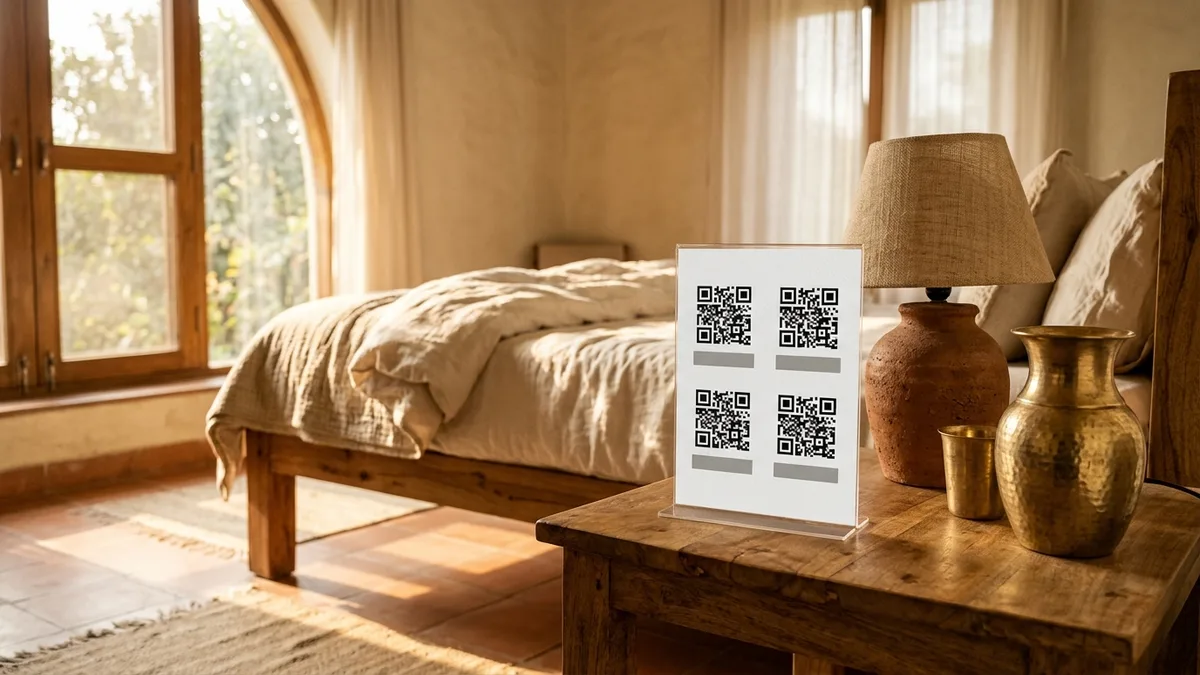
The simplest, most elegant solution is a printed A5 guest welcome card resting on the bedside table, featuring four dedicated QR codes that handle connectivity, host communication, navigation, and reviews in seconds.
The five questions every homestay guest asks (and why paper beats a WhatsApp forward)
Throughout any guest stay, customer inquiries invariably cluster around five repetitive touchpoints:
- “What is the Wi-Fi password?” (Often followed by: “Is the letter ‘O’ a zero or an uppercase letter?”)
- “How do I reach the host if we need an extra blanket, drinking water, or fresh towels?”
- “How do we guide an auto-rickshaw or taxi driver back to the property after dinner in town?”
- “What time is breakfast served, and when is check-out tomorrow?”
- “Where can we leave feedback or a review before we leave?”
Relying on chat messages creates friction. When the primary traveler goes out for an afternoon trek, family members left in the room have no way to contact the kitchen or connect a new tablet to the router. A physical card placed where guests naturally set down their keys and phones provides instant, independent answers for everyone in the room.
What goes on a guest welcome card: the four-block layout
An effective welcome card is cleanly divided into four quadrant cards, each pairing a clear functional heading with a scannable QR code:
| Card Quadrant | Guest Action | Underlying Technology | What It Solves |
|---|---|---|---|
| 1. High-Speed Wi-Fi | Scan to join wireless network | Standard WPA/WPA2 Wi-Fi URI scheme | Joins phones instantly with zero password typing errors |
| 2. Host WhatsApp Chat | Scan to request housekeeping or tea | Direct wa.me link with pre-filled room number | Host knows immediately which bedroom is requesting service |
| 3. Return Directions | Scan to open Google Maps or DIGIPIN | Precise geographic coordinates or pin code | Allows cab and auto drivers to drop guests at your front gate |
| 4. Google Review | Scan to leave feedback at departure | Direct Google Business Profile review link | Captures 5-star reviews while the happy stay is fresh in mind |
Wi-Fi QR code: connect guests in five seconds without typing complex passwords
Nothing tests a traveler’s patience faster than attempting to type a 16-character alphanumeric Wi-Fi password on a mobile keyboard in dim room lighting. A single mistyped symbol means starting all over again.
Under the international Wi-Fi Alliance specification, a QR code can encode your network credentials in a standardized URI format:
WIFI:S:JayHomestay_Guest;T:WPA;P:PineForest92#;H:false;;
When an iPhone or Android phone camera scans this code, a banner pops up saying: “Join network ‘JayHomestay_Guest’?”. The guest taps “Join”, and their device connects immediately. They never need to see, memorize, or manually type the password.
You can generate this permanent, uncompressed code in seconds using the free QR code generator on beepscard.com (select the Wi-Fi option). Note that if you ever change your router’s security password, you will need to print a fresh card.
Host WhatsApp link: pre-filling the guest room number to answer requests fast
When a guest needs an extra towel or wants to order coffee at 7 AM, you want them to reach your caretaking team smoothly without dialing a personal mobile number from room to room.
Instead of listing a raw phone number, generate a click-to-chat QR code using our free WhatsApp link generator with a pre-filled draft. Customize the message per room:
Hi Jay Homestay, I am staying in Room 2 (Valley View) and have a request regarding...
When the guest scans the code, their WhatsApp opens with that exact sentence already waiting in the message box. They simply type their specific need (“could we get two cups of black coffee?”) and hit send. You immediately know which room is asking, saving ten minutes of clarifying back-and-forth messages.
Return directions: sharing a Google Maps pin and India Post DIGIPIN for easy taxi drops
Most homestays are tucked away in picturesque, off-beat locations: halfway up a plantation road, down a coastal lane, or off an unpaved village track. While guests arrive following directions you sent beforehand, getting back from local sightseeing or dinner in the nearby market is where people get lost.
Local auto-rickshaw drivers and taxi operators often do not know your homestay by name, especially if you opened recently. By placing a navigation QR code on the welcome card, guests can simply scan the code on their own phone and hand the live turn-by-turn map directly to their driver.
For rural properties where traditional street addresses do not exist, pair your Google Maps link with your 10-character India Post DIGIPIN. You can read our detailed guide on displaying doorstep coordinates and DIGIPIN on physical cards to ensure zero delivery or cab drop confusion.
Google reviews at check-out: how to ask ethically under Google’s guidelines
Online reviews are the lifeblood of independent homestays. Over 85% of direct bookings come from travelers who read positive Google Maps reviews after finding your listing.
However, Google’s merchant guidelines strictly prohibit incentivizing reviews. You must never write: “Scan to leave a 5-star review for a 10% discount on your bill” or gate negative feedback behind a private form. Google’s automated spam algorithms flag and remove reviews generated through transactional incentives.
Instead, use our free Google review link and QR generator to create a direct review card with a warm, genuine prompt:
“Loved your morning in the hills? We are a small family-run homestay. Scan here to share your travel experience on Google Maps.”
House rules wording that sets clear boundaries without sounding rude
Setting expectations regarding quiet hours, smoking, and hot water is essential to prevent awkward misunderstandings. But your welcome card should read like an inviting host, not a hostel warden.
Compare these phrasing examples for your card footer:
| Topic | Harsh / Cold Phrasing (Avoid) | Hospitable Phrasing (Recommended) |
|---|---|---|
| Quiet Hours | Strictly no loud music or noise after 10 PM. Violators will be reported. | We share the valley with wildlife and peaceful neighbors. Please keep sound levels gentle after 10 PM. |
| Smoking | No smoking in rooms. ₹5,000 fine for room odor cleaning. | To keep our timber rooms fresh for future guests, smoking is designated strictly to the garden patio. |
| Breakfast & Meals | Kitchen closes at 10 AM. No orders taken after deadline. | Fresh home-cooked breakfast is served in the dining pavilion from 8:00 AM to 10:00 AM. |
| Check-out Timing | Check-out is strictly 11 AM. Overstaying will be billed extra. | Check-out is at 11:00 AM so our housekeeping team can prepare for arriving guests. Let us know if you need bag storage. |
A printable setup checklist for homestay bedrooms
Before placing your welcome stands in guest rooms, complete this five-point verification check:
- Verify Wi-Fi from the bedside position: Sit directly on the guest bed and scan the Wi-Fi code. Ensure your router signal is strong enough inside the room (at least two bars) for reliable streaming.
- Check each room’s WhatsApp pre-fill text: Ensure Room 1’s standee says “Room 1”, and Room 2’s standee says “Room 2”. Placing mismatched stands leads to housekeeping delivering tea to the wrong door.
- Use rigid, spill-proof materials: Bedside tables frequently encounter condensation from water tumblers or morning tea spills. Print your welcome cards on 350 GSM matte cardstock and display them inside clear, standing acrylic frames.
- Ensure high room contrast: Keep the QR codes crisp black on pure white backgrounds. Never print codes on textured craft paper or dark wood backgrounds, which fail to scan under dim bedside lamps.
- Pair with a contactless backup: For guests arriving late at night when lighting is low, an NFC-enabled smart touch card allows guests to simply tap their phone against the standee to launch your guest hub instantly.
Frequently Asked Questions
Does the guest need a special app to scan the Wi-Fi QR code?
No. Both Apple iOS (iPhone Camera app) and Android (standard Camera app or Google Lens) natively support Wi-Fi QR code scanning. Pointing the phone’s native camera at the code automatically prompts the user to join the network with one tap.
Can I update the Wi-Fi password without printing new cards?
Because Wi-Fi codes are static, the credentials are baked directly into the black and white squares. If you change your router’s security key, you must reprint the card. To avoid this, keep your guest network credentials stable and use client device isolation on your router rather than frequently rotating passwords.
What size should a bedside welcome card be?
An A5 sheet (14.8 cm x 21 cm) displayed in a vertical portrait acrylic stand is ideal. It provides ample space for four distinct 3.5 cm x 3.5 cm QR codes, explanatory captions, and a polite four-line house rules footer without appearing cluttered.
How do I handle guests who have foreign international SIM cards without local mobile data?
The Wi-Fi QR code works completely offline without requiring any mobile data. Once the guest scans the Wi-Fi code and connects to your local broadband, their phone can scan the remaining WhatsApp and Maps codes effortlessly.
Sources & Technical References
- Wi-Fi Alliance – Wi-Fi Protected Setup Specification for Device Provisioning and Barcode Encoding, checked 30 October 2026.
- Google Business Profile Help – Policies and guidelines on customer review solicitation and authentic feedback, checked 30 October 2026.
- Beeps Card Editorial Standards – Methodology for hospitality touchpoint testing and contactless guest experience standards, checked 30 October 2026.
How to Write the One-Line Bio on Your Digital Visiting Card (With 24 Copy-Ready Examples by Profession)